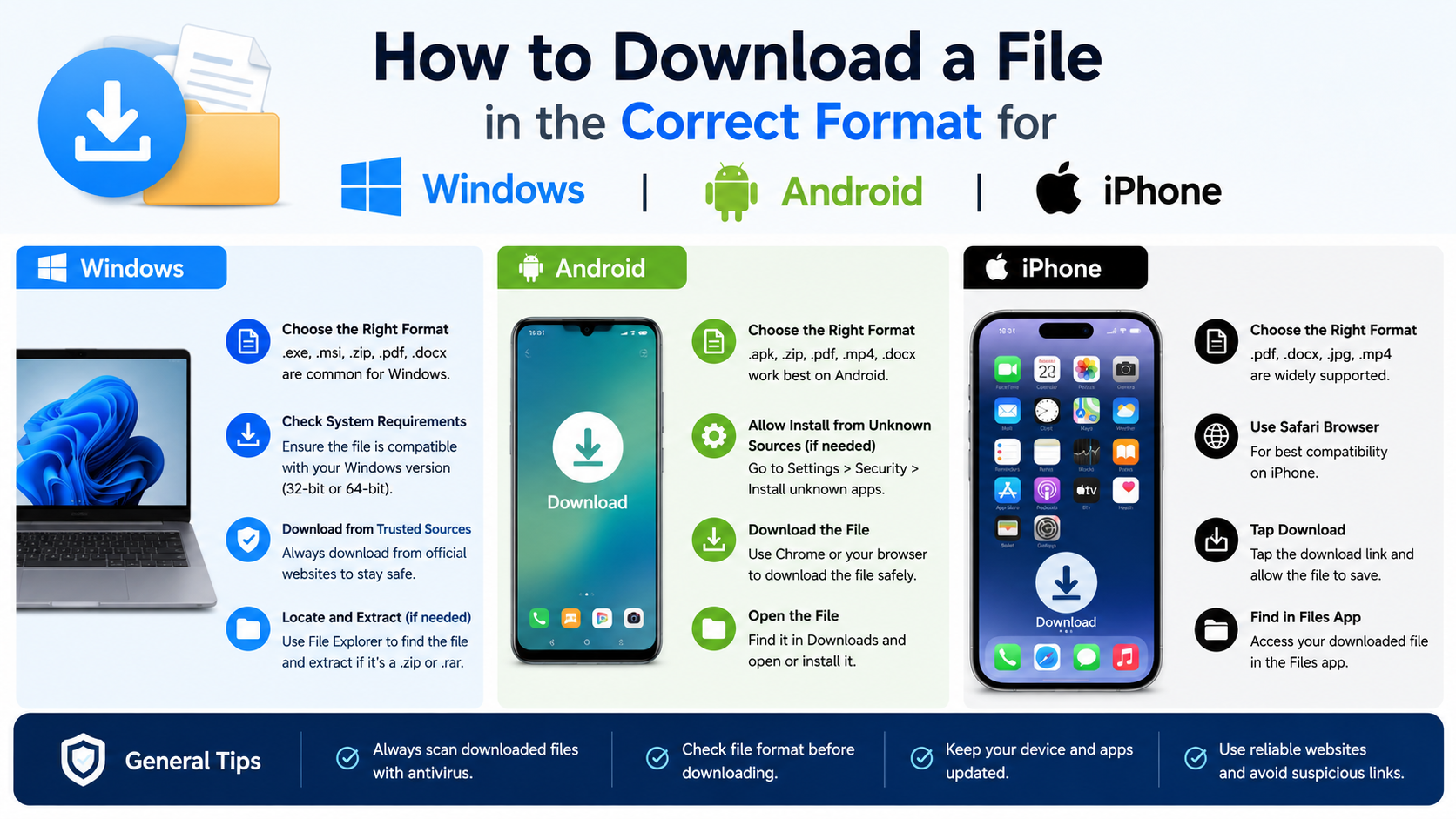
How to Download a File in the Correct Format for Windows, Android, and iPhone
The correct download format depends on what you want to do with a file and which device will open it. Select the format offered by the trusted website, confirm that your device supports it, and download it without changing the file extension manually. A .pdf is suitable for reading, .docx for editing in Word, .jpg for widely compatible images, and .zip for a group of compressed files.
This guide explains how to choose and download the right format on Windows, Android, and iPhone, how to open common file types, and what to do when a download will not open.
Key Takeaways
- Choose the format based on the task—reading, editing, sharing, playing or installing.
- Download from the publisher’s official website or an authorised app store whenever possible.
- Renaming a file extension does not convert the file into another format.
- Windows normally saves browser downloads in the Downloads folder; Android uses the Files or Downloads app; iPhone uses Files > iCloud Drive > Downloads.
- APK files are Android installation packages. iPhone apps should normally be installed through the App Store, not downloaded as IPA files.
- If a file fails to open, check its extension, incomplete-download status, required app, storage space and security warnings.
What does “download format” mean?

A file format is the way information is stored inside a file. The format is usually shown by the filename extension after the final dot:
marksheet.pdfproject.docxphoto.jpgsong.mp3installer.exearchive.zip
The extension helps the operating system select a compatible application. Microsoft explains that Windows file extensions identify the file type and which programs can open it. Showing extensions in File Explorer can help you identify an unfamiliar download: open File Explorer > View > Show > File name extensions. Microsoft Support
A crucial distinction is that renaming an extension is not conversion. Changing report.docx to report.pdf only changes its name; it does not create a valid PDF. Use the original website’s export option or a reputable conversion application instead.
Which file format should you choose?
Use this quick guide before selecting a download button.
| Purpose | Usually suitable format | Why |
|---|---|---|
| Read or print a document | Preserves layout across devices | |
| Edit a document | DOCX or ODT | Text and formatting remain editable |
| Use data in a spreadsheet | XLSX or CSV | XLSX retains formulas; CSV works with many systems |
| Share a photograph | JPG/JPEG | Small and widely supported |
| Preserve image quality or transparency | PNG | Lossless quality and transparent backgrounds |
| Play a video on most devices | MP4 (H.264/AAC where offered) | Broad compatibility |
| Play audio or save music | MP3 | Small size and widespread support |
| Download multiple files together | ZIP | Combines and compresses files |
| Install Windows software | EXE or MSI from the publisher | Designed for Windows installation |
| Install an Android app manually | APK from a legitimate developer | Android package format; use caution |
| Install an iPhone app | App Store listing | Apple’s standard distribution method |
The download page may offer several quality levels or variants. For example, a PDF marked “print” may be larger than a “web” PDF, while a 1080p MP4 uses more storage and data than a 480p version. On Indian mobile connections, choosing a smaller file can reduce data use, but do not sacrifice required quality for an important document or video.
How to download the correct format on Windows
The safest method is to use the official publisher’s download page and select the format designed for Windows or your intended application.

Download a document, image or ZIP file
- Open the legitimate website in Chrome, Edge or another trusted browser.
- Find the file’s Download, Export or Save as option.
- Select the required format, such as PDF, DOCX, JPG or ZIP.
- If the browser asks for a location, select a known folder and choose Save.
- Wait until the download is complete before opening the file.
- Open File Explorer and check the Downloads folder, or the location you selected.
In Chrome, you can enable Settings > Downloads > Ask where to save each file before downloading. Chrome’s official instructions also explain how to change the default download location and view recent downloads. Google Chrome Help
Microsoft Edge shows its download folder under Settings and more > Settings > Downloads. You can select Change to choose another folder or enable the option to ask where each file should be saved. Microsoft Support
Download and install Windows software
For an application, choose the Windows installer supplied by the developer. Common formats include:
.exe: an executable installer or program.msi: a Windows Installer package.zip: a compressed archive that may contain a portable application or installer
Check whether the publisher offers separate 64-bit (x64), 32-bit (x86) or ARM64 versions. Choose the one matching your Windows device. Avoid “cracked”, repacked or modified installers: they may contain malware, unwanted programs or copyright-infringing content.
Before running an .exe or .msi, verify the website address, publisher name and Windows security prompt. If the download is unexpectedly an archive, extract it first using Extract All, then read any included instructions.
How to download the correct format on Android
Android browsers generally save downloaded files to the device’s default Downloads location. In Chrome, open the website, touch and hold a download link, then tap Download link (or tap the download icon for supported media). Google’s instructions say downloaded files can be managed from Chrome’s More (⋮) > Downloads or the device’s Files app. Google Chrome Help for Android
To locate a file:
- Open Files, Files by Google or your phone maker’s file manager.
- Tap Downloads or browse by category, such as Documents, Images or Videos.
- Tap the file to open it with a compatible app.
- If prompted, choose an installed app such as a PDF reader, Office app, gallery or media player.
Some manufacturers use names such as My Files. The exact menu can vary by Samsung, Xiaomi, OnePlus, Motorola and other models.
APK downloads and Android app installation
An APK is an Android application package. The safest option is still Google Play, because it provides app signing, updates and security checks. Download an APK manually only from the app developer’s official site or another source you can independently trust.
If Android blocks installation, it may require permission for the browser or file manager to install unknown apps. Android versions and manufacturer settings differ, so only enable this permission for the specific trusted source, install the app, and disable the permission afterwards. Never install an APK that asks for unnecessary access to SMS, contacts, accessibility controls or banking information.
Do not confuse an APK with:
.AAB(Android App Bundle), normally uploaded by developers to Google Play rather than installed directly.XAPKor split packages, which may require the distributor’s official installer.ZIP, which is an archive and not automatically an installable app
How to download the correct format on iPhone
Safari downloads from the internet normally appear in the Files app. Apple says to open Files > Browse > iCloud Drive > Downloads; Safari also displays a Downloads button next to the search field after a download. Apple Support
Follow these steps:
- Open Safari and visit the official file-hosting or publisher website.
- Tap the link for the required format, such as PDF, DOCX or ZIP.
- Confirm Download if Safari asks.
- Tap the Downloads button near the address bar to see progress.
- Open Files, tap Browse, then select iCloud Drive > Downloads.
- Tap the file. Use the Share button to copy it to On My iPhone, another app or a cloud service.
You can also choose On My iPhone when saving if you want the file stored locally rather than synchronised through iCloud. Apple notes that photos may appear in the Photos app instead of Files, depending on how they were saved. Apple Support
ZIP files on iPhone
iOS can open many standard ZIP archives directly. In Files, tap the ZIP file; iPhone creates an extracted folder that you can open. If the archive is encrypted, unusually large or damaged, you may need a reputable archive app or a computer.
What about IPA files?
An IPA is an iPhone or iPad application package used mainly for development and controlled distribution. Regular users should install apps through the App Store or an authorised enterprise, school or beta-testing method. A random IPA download is not an official substitute for the App Store and can create security, compatibility and account risks.
Downloading one file for all three platforms
When a file must work on Windows, Android and iPhone, select a cross-platform format:
- PDF for documents that do not need editing
- JPG or PNG for images
- MP4 for common video playback
- MP3 for standard audio
- ZIP when you need to transfer several files
For editable documents, DOCX generally has broad support through Microsoft Word, Google Docs and compatible office apps, but advanced formatting may change between applications. If the recipient only needs to read or print the document, export a PDF instead.
Why a downloaded file will not open
Try these fixes in order:
- Check the extension. Make sure the filename ends in the format advertised by the website.
- Finish the download. A partial file may have a temporary extension or a much smaller size than expected.
- Use the right application. Install a trusted PDF reader, office suite, media player or archive utility from an official store.
- Do not simply rename it. Convert the file with the original program or a reputable converter.
- Check storage and permissions. Free space and allow the file manager to access storage when required.
- Download again. An unstable Wi-Fi or mobile-data connection can corrupt a file.
- Look for a password or account requirement. Some ZIP archives, ebooks and business files require credentials.
- Review security warnings. Do not bypass browser or antivirus warnings unless you have confirmed the publisher and file source.
If Windows cannot identify a file, right-click it and choose Open with to see compatible programs, or search the Microsoft Store by extension. Microsoft also recommends using Settings > Apps > Default apps to assign a preferred application to a file type. Microsoft Support
Security checklist for downloads
- Confirm the domain name letter by letter and use HTTPS.
- Prefer the developer, government department, school, bank or official store.
- Avoid download buttons surrounded by advertisements or fake “Update” messages.
- Scan unexpected executable files with your security software.
- Do not disable Windows Defender, Play Protect or iPhone security controls to force a download.
- Be cautious with pirated games, cracked software, modded APKs and “premium unlocked” files.
- For sensitive documents, avoid uploading them to unknown online converters.
- Keep a backup of important certificates, invoices and identity documents in a trusted cloud account or external drive.
Frequently Asked Questions
What is the best format to download a document?
Choose PDF when you need consistent viewing or printing. Choose DOCX or ODT when you need to edit the text and formatting.
Can I change a file’s format by renaming the extension?
No. Renaming changes only the filename. Use an application’s Export or Save As function, or a trusted converter, to create a genuine new format.
Where are downloaded files stored on Android?
Open the Files app or your manufacturer’s file manager and check Downloads. You can also open Chrome’s More > Downloads list.
Where do Safari downloads go on iPhone?
They normally go to Files > Browse > iCloud Drive > Downloads. Safari’s Downloads button provides a shortcut to recent files.
Should I download an APK instead of using Google Play?
Use Google Play whenever possible. If an APK is necessary, obtain it from the developer’s official website, verify the source and avoid modified packages.
Which format works on Windows, Android and iPhone?
PDF, JPG, PNG, MP4, MP3 and standard ZIP files generally have broad support. The required app and codec can still vary by device.
Why does my PDF open in the browser instead of downloading?
Browsers may display PDFs directly. Use the browser’s download icon or Save link as, and check PDF settings if you want PDFs saved automatically.
Is a third-party download link safe?
Not automatically. A mirror may host an altered, outdated or malicious file. Compare its publisher, checksum or signature with information from the official developer before opening it.