How Long Should a 100GB Download Take at 10, 50, 100, and 500 Mbps?
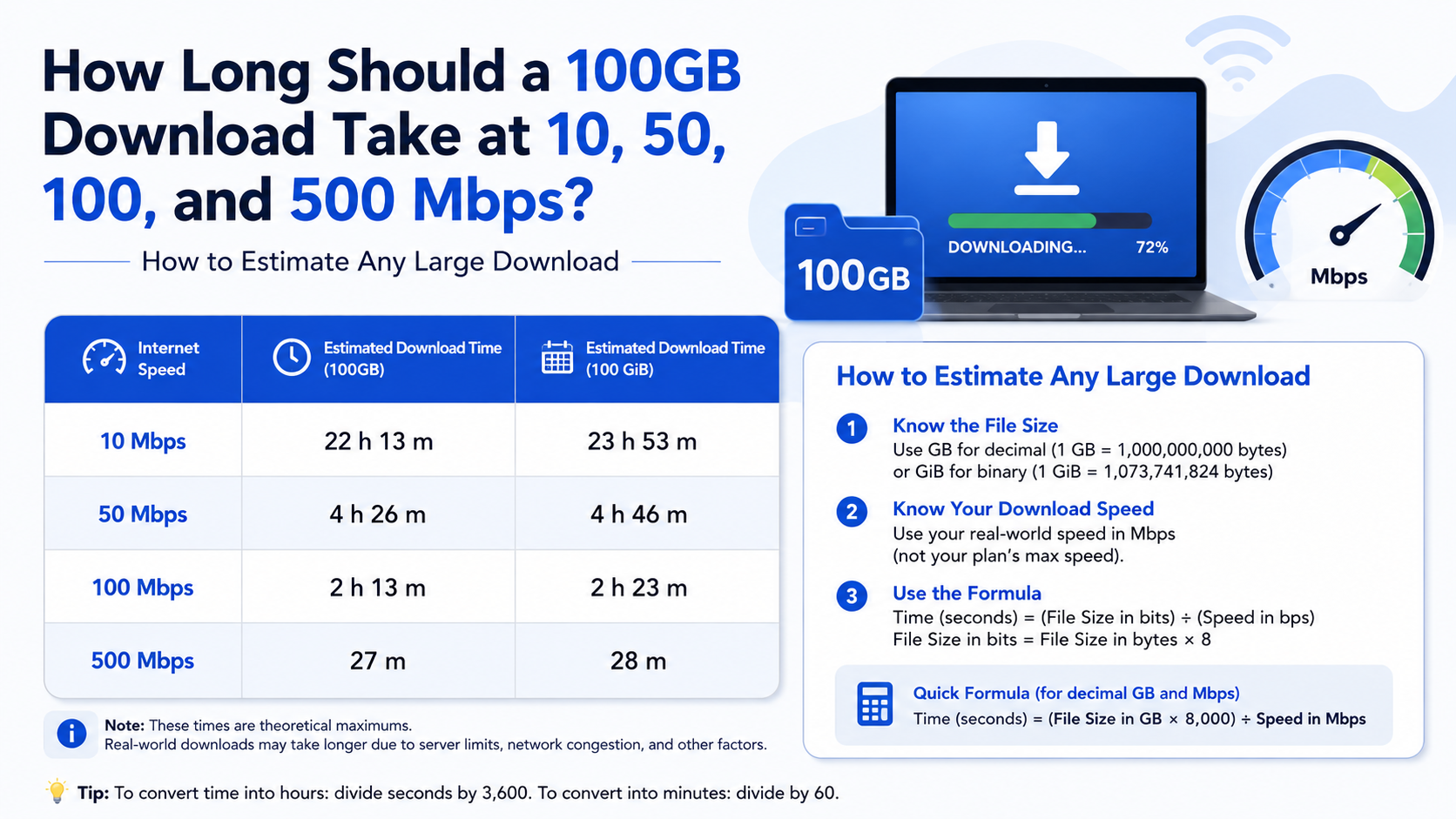
A 100GB download takes approximately 22 hours 13 minutes at 10 Mbps, 4 hours 27 minutes at 50 Mbps, 2 hours 13 minutes at 100 Mbps, and 26 minutes 40 seconds at 500 Mbps under ideal conditions.
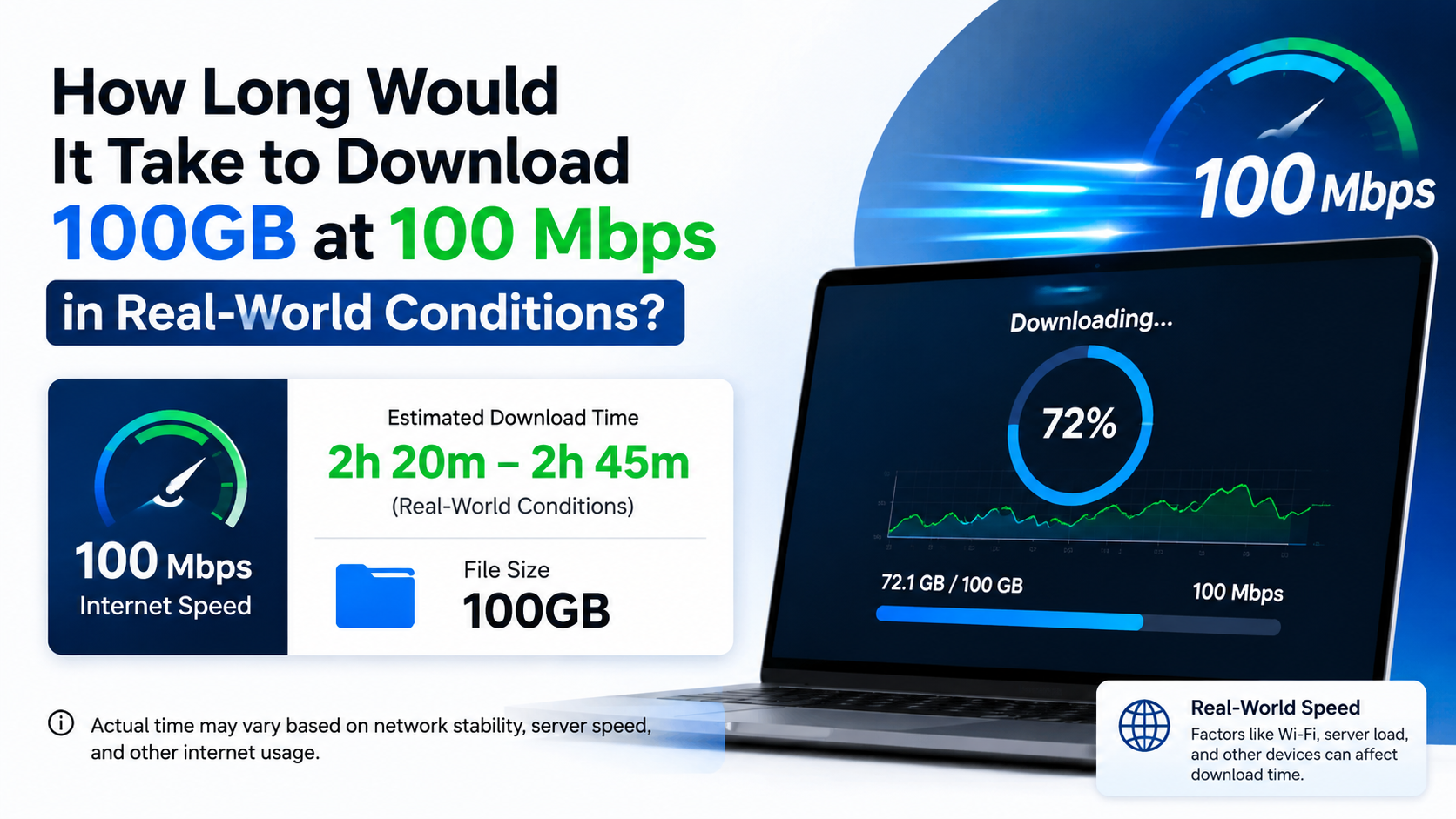
Real downloads usually take longer because of Wi-Fi losses, server limits, network congestion, protocol overhead and other devices using the connection. A practical estimate is often 10–30% longer than the theoretical time.
Key Takeaways
- At 10 Mbps, a 100GB file needs about 22 hours 13 minutes ideally.
- At 50 Mbps, expect about 4 hours 27 minutes ideally.
- At 100 Mbps, the theoretical time is about 2 hours 13 minutes.
- At 500 Mbps, the same file can finish in about 26 minutes 40 seconds.
- Internet plans use megabits per second (Mbps), while download apps usually show megabytes per second (MB/s).
- A wired Ethernet connection and a fast download server usually provide more consistent results than Wi-Fi.
100GB Download Time at Different Internet Speeds

The following calculations treat 100GB as a decimal gigabyte: 1GB = 1,000,000,000 bytes. This is the convention commonly used by storage manufacturers and data-transfer services. NIST explains the difference between decimal GB and binary GiB units in its measurement guidance. NIST unit definitions
| Internet speed | Approximate maximum rate | Ideal time for 100GB | Practical estimate at 80% efficiency |
|---|---|---|---|
| 10 Mbps | 1.25 MB/s | 22 hr 13 min | 27 hr 47 min |
| 50 Mbps | 6.25 MB/s | 4 hr 27 min | 5 hr 33 min |
| 100 Mbps | 12.5 MB/s | 2 hr 13 min | 2 hr 47 min |
| 500 Mbps | 62.5 MB/s | 26 min 40 sec | 33 min 20 sec |
The “practical” column allows for approximately 20% efficiency loss. Actual results can be faster or slower depending on the download source and your local network.
Quick answer
If your Indian broadband plan is rated at 100 Mbps, plan for roughly 2 hours 15 minutes to 3 hours to download 100GB. On a reliable 500 Mbps fibre connection, it may take 30–40 minutes.
How the Download-Time Calculation Works
Internet speed is normally advertised in Mbps, meaning megabits per second. File sizes are shown in GB or MB, which are measured in bytes.
Because one byte contains eight bits:
- 100 Mbps ÷ 8 = 12.5 MB/s
- 500 Mbps ÷ 8 = 62.5 MB/s
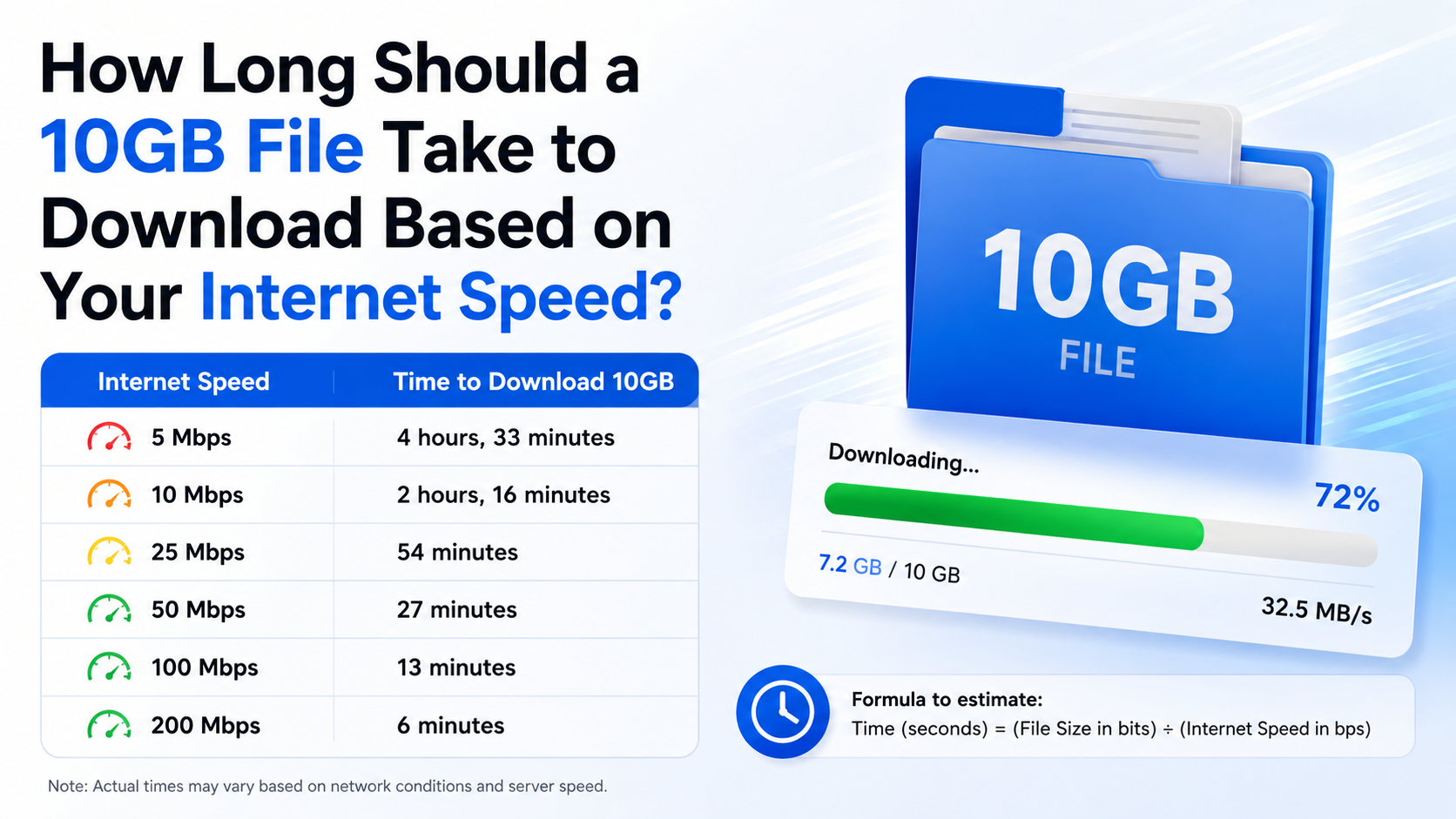
The basic formula is:
Download time in seconds = File size in bits ÷ Download speed in bits per secondFor a 100GB file:
100GB × 8 = 800 gigabits
800,000 megabits ÷ 100 Mbps = 8,000 seconds
8,000 seconds equals approximately 2 hours 13 minutes 20 seconds.
This is a best-case calculation. It assumes the connection sustains its full advertised speed from start to finish and that the server can supply data just as quickly.
Why Your 100GB Download May Take Longer
An advertised broadband speed is generally a maximum or typical access speed, not a guarantee that every download server will deliver that rate continuously. TRAI requires Indian service providers to publish typical download and upload speeds for tariff offerings and provides the MySpeed app and portal for testing connections. TRAI broadband FAQ | TRAI MySpeed
Common causes of slower downloads include:
Wi-Fi limitations
Wi-Fi performance changes with distance, walls, interference and router quality. A 100 Mbps plan may show only 40–80 Mbps in a distant room, particularly on a crowded 2.4GHz network.
For a large download:
- Use the 5GHz or 6GHz Wi-Fi band when nearby.
- Keep the router in an open, central location.
- Connect the computer or console by Ethernet if possible.
- Stop other high-bandwidth activities temporarily.
Server-side limits
The website, game launcher or cloud provider may limit each connection. A powerful 500 Mbps broadband plan cannot force a server to send data faster than its own capacity or policy allows.
Some services also divide downloads into multiple parts. Others use a single connection that may be slower, especially during a major game launch or software release.
Network congestion
Even fibre connections can slow during busy evening periods. International routes, ISP peering and congestion between your provider and the download server can affect performance.
Mobile data is usually more variable. Signal strength, tower load, indoor coverage and data-management policies can cause large speed changes during a single download.
Other devices and applications
Smart TVs, security cameras, phones, cloud backups and streaming services share the same connection. If several devices are active, the download receives only part of the available bandwidth.
Storage speed and device performance
A nearly full hard drive, slow external disk or heavily used storage device can reduce the rate at which a game or software package is written. Some installers also pause to unpack, verify or patch files after the network transfer finishes.
Decimal GB Versus Binary GiB
A file described as “100GB” may not represent exactly the same amount of data in every application.
- 100GB (decimal) = 100,000,000,000 bytes
- 100GiB (binary) = 107,374,182,400 bytes
A 100GiB download is about 7.4% larger than a decimal 100GB download. Therefore, at the same 100 Mbps speed:
- Decimal 100GB: about 2 hours 13 minutes
- Binary 100GiB: about 2 hours 23 minutes
Windows and some game launchers may display binary-style values while marketing pages use decimal values. Check the actual size shown by the service you are using.
How to Check Your Real Download Speed in India
Before estimating a long download, test the connection you are actually using.
- Stop other downloads, video streams and cloud synchronisation.
- Connect the device to the router using Ethernet, if available.
- Run a test through TRAI MySpeed or your ISP’s official speed-test page.
- Note the download speed in Mbps, not the upload speed.
- Repeat the test at the time you normally download, such as evening peak hours.
If the test reports 82 Mbps on a 100 Mbps plan, calculate using 82 Mbps for a more realistic estimate. At that sustained speed, a decimal 100GB file would take approximately 2 hours 42 minutes before additional overhead.
How to Estimate Any Large Download
You can calculate the time for a game, operating-system image, video archive or backup using this method:
- Convert the file size to megabits.
- Divide by the sustained download speed.
- Divide the result by 3,600 to convert seconds into hours.
- Add 10–30% for normal overhead and speed fluctuations.
Example: a 75GB game at 100 Mbps:
75GB × 8 = 600,000 megabits
600,000 ÷ 100 = 6,000 seconds
6,000 seconds = 1 hour 40 minutes
A practical planning time would be around 2 to 2.25 hours, assuming the server and local network perform normally.
What to Do Before Starting a 100GB Download
For a reliable download, use the publisher’s official website, an authorised app store or the software’s built-in launcher. Avoid unknown APK sites, “cracked” installers and unverified mirrors: they may contain modified files, malware or copyright-infringing material.
Before clicking download:
- Confirm that the file size matches the official listing.
- Make sure you have more free storage than the displayed download size; installation may require temporary space.
- Plug laptops and consoles into power.
- Disable sleep settings that interrupt network activity.
- Use a download manager or launcher that supports pause and resume.
- Schedule the transfer overnight if your connection is slow or capped.
- Check whether your broadband or mobile plan has a fair-use limit.
A 100GB transfer consumes approximately 100GB of data, plus protocol overhead. On a limited mobile plan, it can use most or all of your monthly allowance.
Troubleshooting a Download That Is Too Slow
The speed is shown in MB/s instead of Mbps
Multiply the displayed MB/s value by eight to estimate Mbps.
- 5 MB/s ≈ 40 Mbps
- 10 MB/s ≈ 80 Mbps
- 12.5 MB/s ≈ 100 Mbps
- 62.5 MB/s ≈ 500 Mbps
The speed repeatedly drops to zero
Pause and resume the download, restart the launcher and check whether the server is experiencing heavy demand. If possible, try another official mirror or download region.
Speed tests are fast but the download is slow
This usually indicates a server, routing or launcher limitation rather than a problem with your broadband plan. Test a different legitimate download source to compare.
Wi-Fi is much slower than Ethernet
Move closer to the router, switch bands, reduce interference and update the router firmware. For a desktop computer, console or smart TV, Ethernet is usually the simplest solution.
The download finishes but installation continues
Large games and software often decompress, verify or compile files after the network transfer. Installation time depends on your CPU, SSD or hard drive and available free space; it is separate from download time.
Frequently Asked Questions
How long should 100GB take to download at 10 Mbps?
Ideally, about 22 hours 13 minutes. With normal overhead and speed variation, allow approximately 27–30 hours.
Is 100 Mbps fast enough to download a 100GB game?
Yes. The theoretical time is about 2 hours 13 minutes for 100GB, while a practical estimate is roughly 2 hours 45 minutes to 3 hours.
How long does 100GB take at 500 Mbps?
The ideal calculation is 26 minutes 40 seconds. In normal conditions, expect approximately 30–40 minutes, provided the server supports high throughput.
Why does a 100 Mbps plan show only 12 MB/s?
That is normal. Providers advertise megabits per second, while many download programs display megabytes per second. Dividing 100 Mbps by eight gives a maximum of about 12.5 MB/s before overhead.
Does 5GHz Wi-Fi guarantee the full broadband speed?
No. 5GHz can be faster and less congested than 2.4GHz, but distance, walls, device capability and interference still affect the result. Ethernet is more consistent.
Will a 500 Mbps plan always download five times faster than a 100 Mbps plan?
Only when the server, router, device and network route can all handle the extra capacity. If the download server is limited to 150 Mbps, upgrading beyond that will not produce a fivefold improvement.
How much data does downloading a 100GB file use?
Approximately 100GB, with a small additional amount for network overhead. On a capped mobile or broadband plan, check your remaining data allowance before starting.
Should I use a download manager for a very large file?
A reputable download manager can help by resuming interrupted transfers and, where the server permits it, using multiple connections. Download it from the developer’s official site or an authorised store.